

MOCA365 Fabric and Power BI · Workspace provisioning and governance
Govern Microsoft Fabric workspaces from creation to review
MOCA365 Fabric and Power BI gives platform teams a governed way to create and oversee Microsoft Fabric and Power BI workspaces, with consistent ownership, usage evidence and reviews of inactive workspaces.
What the product governs
 Microsoft Fabric
 Power BI workspaces
- Domains
- Ownership
- License entitlements
What is MOCA365 Fabric and Power BI?
It brings the MOCA365 template, ownership and lifecycle model to analytics workspaces: platform teams define the patterns, users request, and governance continues to retirement.
Read how MOCA365 Fabric supports Microsoft Fabric governance.
What the video shows
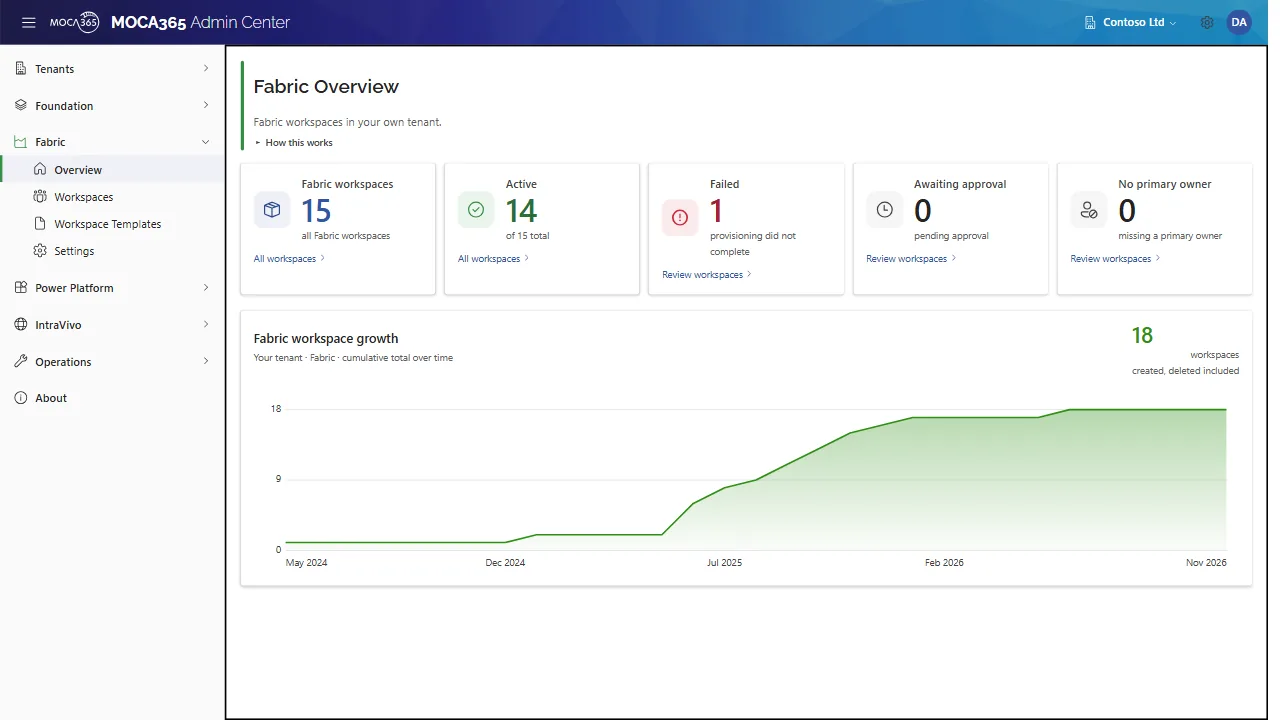
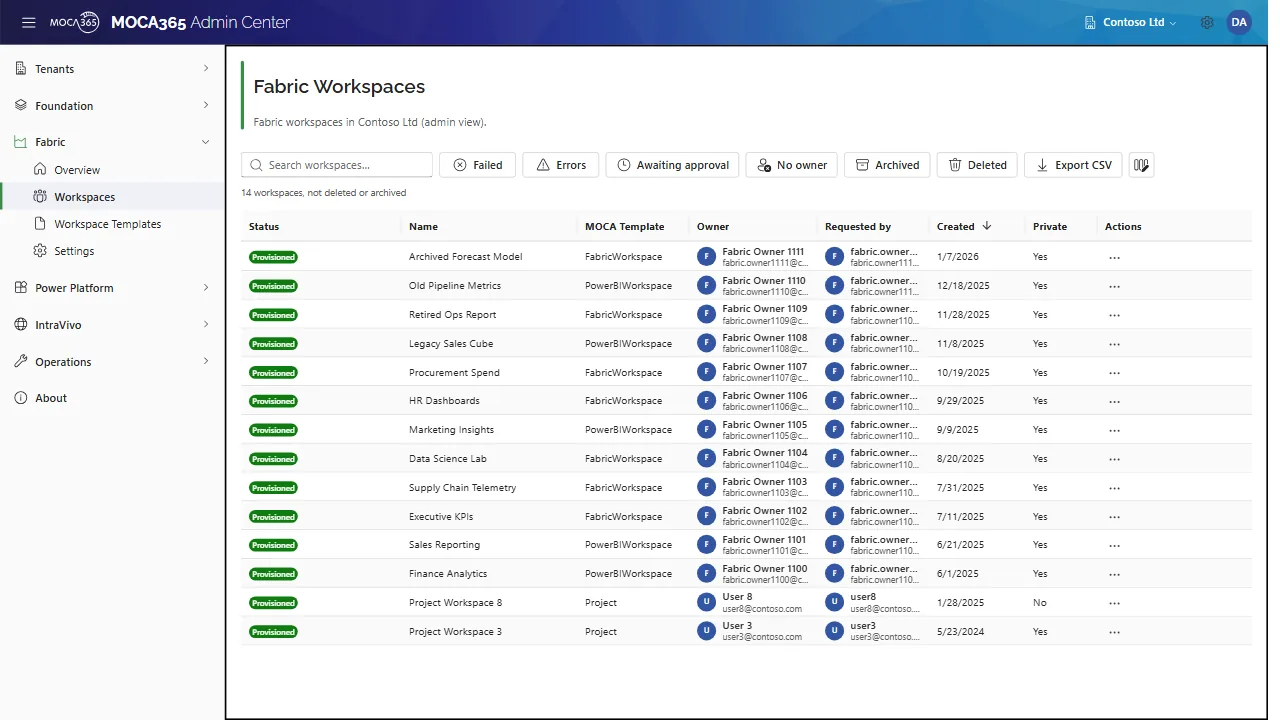
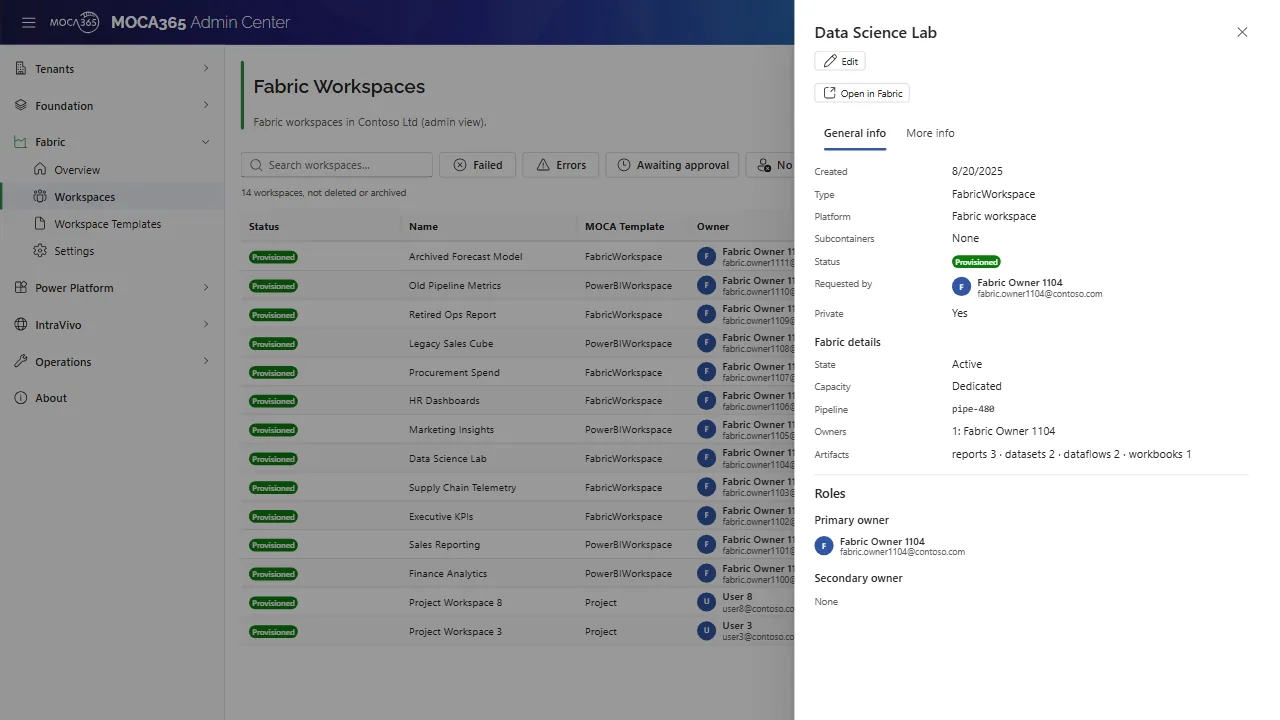
The Fabric overview counts workspaces that are active, failed, awaiting approval or missing a primary owner, and charts workspace growth. The workspace list shows every Fabric workspace with its status, template, owner and requester, and the details of one workspace show its capacity, pipeline, owners and item counts.
The problem
Analytics workspaces multiply faster than anyone can govern them
- Inconsistent workspacesComparable analytics projects get different structures and Dev/Test/Prod setups.
- Unclear ownershipWorkspaces and license entitlements persist without an accountable owner or review.
- Inactive, misplaced workspacesCapacity is used after work ends, and assets sit outside the domain model.
Core capabilities
Every Fabric and Power BI workspace starts from a governed template
- Workspace templatesApproved patterns for recurring analytics requirements.
- Development, Test and ProductionA consistent multi-workspace lifecycle where required.
- OwnershipAn accountable owner for every workspace. Approval routes come with EVO.
- Domains and usage collectionWorkspaces tied to the domain model, with usage evidence for review.
- License governanceThe request and review behind each Power BI Pro entitlement. MOCA365 does not assign licenses itself.
MOCA365 Fabric and Power BI in the product
The screens your data teams and administrators work in
-
 (full-size screenshot)
Every Fabric workspace with its template, owner and requester. -
 (full-size screenshot)
Workspace details: capacity, owners and item counts for each Fabric workspace.
How organizations use it
Four analytics-governance scenarios
Standardize a new workspace
Provision a workspace with owners, a domain and the approved Development, Test and Production structure.
Keep ownership valid
Validate owners against Entra ID and reassign them as roles change.
Retire inactive workspaces
Surface inactive workspaces in usage reviews and retire them to free capacity.
Govern BI entitlements
Document the request, owner and end of need behind each Power BI Pro entitlement.
MOCA365 Fabric and Power BI
Fabric and Power BI FAQ
Does MOCA365 Fabric require Foundation?
No. It is sold independently.
Can MOCA365 Fabric provision Development, Test and Production workspaces?
Yes. Approved templates can create a consistent multi-workspace structure.
What happens after a Fabric workspace is provisioned?
Configured processes support ownership validation, usage review and lifecycle decisions.
How is MOCA365 Fabric delivered?
Self-hosted, in your own Azure subscription and Microsoft tenant, where your data remains.
See MOCA365 Fabric and Power BI working
We'll show governed workspace requests, Dev, Test and Production templates and inactivity reviews.