

The MOCA365 platform
One Microsoft 365 governance software platform. Five specialized products.
MOCA365 brings governed provisioning, ownership oversight and lifecycle processes to Microsoft 365, Power Platform, Fabric and Copilot Studio. One engine, five products, one tenant or many.
What is MOCA365?
MOCA365 is a governance, provisioning and lifecycle-management platform for Microsoft 365, SharePoint intranets, Microsoft Fabric, Power BI, Microsoft Power Platform and Copilot Studio. It turns governance policies into practical services that apply ownership, security, classification, approval and lifecycle controls from the beginning.
It is built and maintained by Pointwork A/S, a Danish Microsoft specialist. MOCA365 began as a response to the governance challenges IT teams face when Microsoft 365 self-service expands faster than manual administration can support.
What MOCA365 governs
- Teams
- SharePoint
- Power Apps
- Power Automate
- Power BI
- Microsoft Fabric
- Copilot Studio
Governance must keep pace with self-service
Microsoft platforms empower employees to create Teams, SharePoint sites, Power Apps, flows, Power BI workspaces, Fabric resources and Copilot Studio agents without waiting for a traditional IT project.
As the estate grows, ownership can become unclear, permissions can change, usage can decline and content can become outdated. MOCA365 applies governance from creation and can continue with configured checks, reviews and notifications, while supported resources can enter remediation or retirement processes.
Six governance problems that grow with self-service
Common governance problems addressed across the MOCA365 product portfolio.
Workspaces without owners
Unmanaged self-creation can result in collaboration workspaces with unclear or missing ownership.
Departed owners
When people change roles or leave, recorded owners can become invalid and apps or flows can become orphaned.
Ownership and access
Organizations need views of resource ownership, status, usage and governance signals, including inappropriate sharing.
More than one tenant
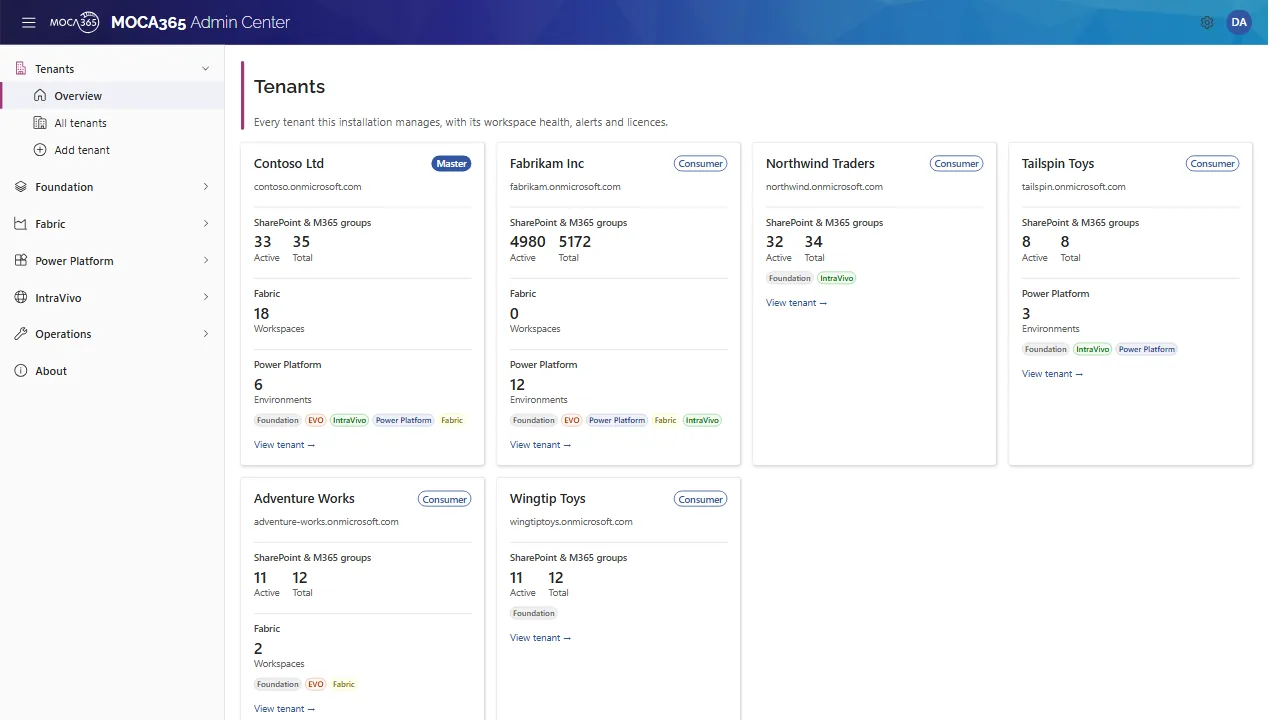
Enterprises and service providers may need to repeat governance manually across separate tenants while preserving each tenant's boundary.
Storage overage
Inactive workspaces and resources whose business purpose has ended can continue consuming storage, capacity or licenses.
Stale content influencing Copilot responses
Old, duplicated and contradictory SharePoint information can influence search and AI-assisted responses.
Five products, each sold on its own
Each is available separately. Organizations can begin with the product covering their priority workload.
One governance engine, applied to each product's workload
The products share a governance engine and apply the capabilities relevant to the Microsoft services each one covers.
Provisioning to policy
Where a product provisions a workspace, it uses an organization-defined template for supported naming, metadata, access and classification requirements. Governance begins at creation rather than as a later correction.
Ownership governance
MOCA365 records accountable owners, validates them against Microsoft Entra ID and can identify missing or invalid ownership when people change roles or leave.
Scheduled lifecycle
Configured checks, reviews and notifications can run on a schedule. Supported resources can enter remediation or retirement processes.
Management by exception
MOCA365 surfaces ownership gaps, inactivity, oversharing, review failures and other governance signals so administrators can focus on resources that require attention.
MOCA365 uses supported Microsoft interfaces to apply the organization's configured governance processes across the resources each product covers.
Every resource needs an owner and a lifecycle that follows its purpose
Each product applies the same principle to its own workload: every resource has an accountable owner, and its lifecycle follows its business purpose.
Ownership and orphaned resources
The person who created a resource is not always the person who can decide its access, accuracy or retirement. MOCA365 records accountable owners, validates them against Microsoft Entra ID and turns a departed, disabled or missing owner into a visible governance event.
Lifecycle management
A project ends or a team reorganizes, and the workspace stays. Configured checks find resources that need a decision, notify the responsible people and move resources whose purpose has ended through the configured restriction, retirement or deletion process.
| Product | Ownership | Lifecycle |
|---|---|---|
| Foundation | Required owners for Teams, sites and groups, with primary and secondary owners where the template asks for them. | Ownership and lifecycle processes for Teams, SharePoint sites and Microsoft 365 Groups. |
| IntraVivo | Content owners for pages, news and documents, validated as people change roles. | Review periods, owner validation and escalation for SharePoint pages, news and documents. |
| Fabric and Power BI | Ownership and access requirements for Fabric and Power BI workspaces. | Inactivity governance for Fabric and Power BI workspaces, with the evidence when a Power BI Pro need ends. It does not assign or remove licenses itself. |
| Power Platform Governance | Apps, flows and Copilot Studio agents whose owner has left, with dependencies exposed for apps and flows. The reassignment is made in the Power Platform admin center. | No lifecycle management. It finds apps, flows and agents with missing or invalid owners, prioritized by risk and dependency. |
Why MOCA365
Five products on one engine, running inside your Microsoft environment
One engine, five products
One engine,
five products
Each product is available on its own and built on the shared MOCA365 governance engine. Organizations can select one product or combine products into a broader governance suite.
Your data, your environment
Your governed data stays in your Microsoft environment
MOCA365 works with data in your Microsoft tenant or Power Platform environment. It does not move customer data outside your Microsoft environment.
Governance without premium
Power Platform governance without premium governance licensing
MOCA365 Power Platform Governance does not require Managed Environments or Power Platform Premium licenses merely to govern the estate. Microsoft licensing still applies to the services your organization uses.
MOCA365 has truly provided us with what we needed.
Anders Jepsen, Senior Solution Architect, Novo Nordisk Global IT
The MOCA365 platform
MOCA365 platform FAQ
Can the MOCA365 products be purchased separately?
Yes. Foundation, IntraVivo, Fabric and Power BI, and Power Platform Governance are independently purchasable products built on the shared MOCA365 governance engine. MOCA365 EVO includes the Foundation feature set and adds capabilities for multi-tenant operation and integration.
Does MOCA365 replace Microsoft Purview or Microsoft security products?
No. MOCA365 orchestrates governance processes and can apply supported Purview settings. Microsoft Purview remains the underlying classification and enforcement engine. MOCA365 does not replace Microsoft Entra ID, Conditional Access or Microsoft Defender.
How does MOCA365 support Microsoft 365 Copilot?
IntraVivo helps keep governed SharePoint content owned, reviewed and relevant. This reduces the risk that obsolete or contradictory information undermines Copilot answers, employee confidence and AI adoption. It does not modify Copilot, train the model or guarantee that every response is correct.
Can MOCA365 govern Copilot Studio agents?
Power Platform Governance brings supported Copilot Studio agents into the MOCA365 operational governance model and helps AI governance teams establish visibility and accountability across the wider Power Platform estate.
Does customer data leave the Microsoft environment?
No. Customer data remains in the customer's Microsoft tenant or Power Platform environment. MOCA365 does not move it outside the customer's Microsoft environment.
Does MOCA365 support more than one Microsoft 365 tenant?
Yes. EVO extends the Foundation governance and provisioning model across several Microsoft 365 tenants.
What is an orphaned Microsoft 365 resource?
A workspace, app, flow, report, agent or item of intranet content whose recorded owner has left, changed role or was never valid, so nobody in the business can answer for its access, accuracy or retirement.
How does MOCA365 know an owner is no longer valid?
Recorded owners are validated against Microsoft Entra ID. A departed, disabled or missing owner becomes a visible governance event.
What triggers a MOCA365 lifecycle review?
Configured checks, for example inactivity, a missing or invalid owner, or a review period that has ended. The responsible people are notified and asked to decide.
What happens to a resource nobody answers for?
It becomes an exception for administrators. Resources whose purpose has ended can move through the configured restriction, retirement and deletion stages rather than being removed by hand.
Find the right starting point
Tell us which workload you need to govern first, and we'll show you the product that fits.